Structures Midterm Review
Study points and highlights from Chapters 0-8
What to Be Able to Do
- Recognize the reusable patterns in each module.
- Trace source through tokens and a tree.
- Explain a result using the evaluator’s rules.
- Follow changes to the environment and output.
- Identify the stage responsible for an error.
Explain why, not just what prints.
New Features, Familiar Patterns
| Module | Pattern we reuse |
|---|---|
| Tokenizer | Match, tag, convert, advance |
| Parser | Consume a rule; return node and remainder |
| Tree | Tags select behavior; children hold substructure |
| Evaluator | Evaluate children; check status; perform work |
| Runner | Connect stages; handle program exit |
Learn the patterns as well as the individual features.
Language and Implementation
| Question | Concept |
|---|---|
| Is this arrangement legal? | Syntax |
| What does it do? | Semantics |
| What machinery runs it? | Implementation |
A grammar alone does not define execution.
Text Becomes Structure

An abstract syntax tree (AST) records operations and grouping.
Execution or Translation?
| Approach | Work performed |
|---|---|
| Interpreter | Execute the program representation |
| Compiler | Translate it for later execution |
| Transpiler | Translate to another source language |
| Just-in-time compiler | Compile during execution |
Different routes; preserve the program’s meaning.
Tokenization: Order Matters
| Recognize first | Otherwise |
|---|---|
// comment before / |
Two division tokens |
| Decimal forms before integers | Only the initial digits match |
<= before < |
One operator becomes two |
| Keywords before identifiers | Keywords become names |
Word boundaries keep printer an
identifier.
Read the Expression Tree
3 + 4 * 5
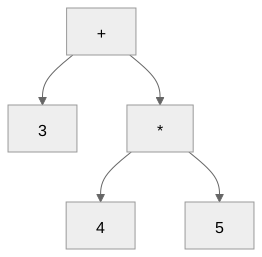
Result: 23. The grouping is already in the tree.
Precedence and Associativity
| Expression | Grouping | Result |
|---|---|---|
8 - 3 - 2 |
(8 - 3) - 2 |
3 |
8 / 4 / 2 |
(8 / 4) / 2 |
1.0 |
3 * -2 |
3 * (-2) |
-6 |
--3 |
-(-3) |
3 |
Precedence separates levels; associativity groups a chain.
Parser Contracts
Extended Backus-Naur Form (EBNF):
term ::= unary { ("*" | "/") unary }
unary ::= "-" unary | factor- A helper returns a node and unused tokens.
{ ... }means repetition;[ ... ]means optional.- The public parser requires the whole input.
Zero or More: The Same Parser Loop
term      ::= unary     { ("*" | "/") unary }
logic_and ::= logic_not { "and" logic_not }
left, tokens = parse_operand(tokens)
while tokens[0]["tag"] in operators:
op = tokens[0]["tag"]
right, tokens = parse_operand(tokens[1:])
left = {"tag": op, "left": left, "right": right}
return left, tokensOptional Once, Repeat, or Recurse?
| Grammar pattern | Parser pattern | Example |
|---|---|---|
[ ... ] |
Check with if |
One comparison; optional else |
{ ... } |
Check with while |
More arithmetic or logical operands |
| Prefix followed by same rule | Recursive call | Unary minus; logical not |
| Required sequence | Consume each part | Identifier, =, expression |
The grammar suggests the control structure.
Reuse Structure, Add Meaning
| Feature | Structure reused |
|---|---|
| String or boolean literal | A tagged node with a value |
Arithmetic, comparison, and |
A tag with left and right children |
Conversion or type() |
One expression child |
| Program, branch, loop body | A statement-list node |
Similar nodes can still have different evaluation rules.
Find the Error’s Stage
| Source fragment | Stage | Reason |
|---|---|---|
3 @ 4 |
Tokenizer | Unrecognized character |
3 + * 4 |
Parser | Operand missing |
3 4 |
Parser | Leftover token |
3 / 0 |
Evaluator | Division by zero |
missing + 1 |
Evaluator | Unknown identifier |
Assignment Changes State
x = 2;
y = x + 3 * 4;
x = x + 1;| After statement | x |
y |
|---|---|---|
| First | 2 | Not bound |
| Second | 2 | 14 |
| Third | 3 | 14 |
Lookup and Assignment Differ
| Environment | Bindings |
|---|---|
| Current | x: 3, $PARENT: parent |
| Parent | x: 10, y: 20 |
- Lookup
x: 3. Lookupy: 20. - Ordinary assignment
y = 7: writes here. - The parent’s
ystays 20.
Strings Are Values
| Expression | Result |
|---|---|
"3" + "4" |
"34" |
number("3") + 4 |
7 |
"ha" * 3 |
"hahaha" |
"ha" * 2.0 |
Type error |
"Answer: " + string(42) |
"Answer: 42" |
Input and Output State
__input = "21";
answer = number(input()) * 2;
print(answer);| Observation | Result |
|---|---|
answer |
Number 42 |
__input |
Empty string, consumed |
__output |
String "42" |
Know Which Version You Mean
| Change | Earlier | Later |
|---|---|---|
| Print spelling | print x |
print(x) |
number(42) |
Type error in Strings and Basic I/O | 42 with Booleans and Comparisons |
| Evaluator return | A value | (value, status) with Returning Status |
New keywords can also invalidate old variable names.
Booleans Are Not Numbers
| Expression | Result |
|---|---|
1 == 1.0 |
true |
true == 1 |
false |
"1" == 1 |
false |
true + 1 |
Type error |
"ant" < "bee" |
true |
Ordering accepts two numbers or two strings, not booleans.
Explicit Conversions and Type
| Expression | Result |
|---|---|
boolean(0) |
false |
boolean(" FALSE ") |
false |
boolean("0") |
Value error |
number(true) |
1 |
type(.5) |
"number" |
type(1 < 2) |
"boolean" |
Logical Grouping
Weakest to strongest:
or → and → not → comparison → arithmetic
| Source | Meaning |
|---|---|
a or b and c |
a or (b and c) |
not x == y |
not (x == y) |
&&, ||, ! |
Same tags as and, or,
not |
Short-Circuiting Skips Work
divisor = 0;
safe = divisor != 0 and 10 / divisor > 2;| Left value | Operator | Right operand |
|---|---|---|
false |
and |
Skipped |
true |
or |
Skipped |
No evaluation means no input, lookup, or runtime error.
Value and Status Are Separate
| Evaluation | Python result pair |
|---|---|
2 + 3 |
(5, None) |
2 > 3 |
(False, None) |
print(5) |
(None, None) |
exit(7) |
(7, "exit") |
| Failed assertion | (1, "exit") |
A false value is not a special status.
Reuse the Evaluation Contract
value, status = evaluate(child, environment)
if status is not None:
    return value, status
# Only now use the value or perform the next effect.
The same check protects assignment, print, conversions, arithmetic, conditions, and statement lists.
Propagate Before Continuing
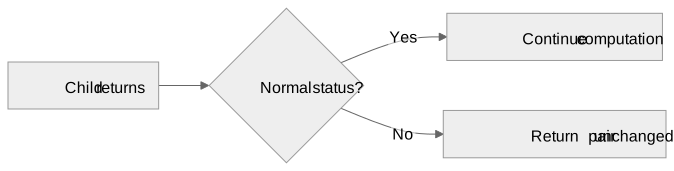
x = 3;
x = exit(7) + number(input());
No input. No addition. No store. x stays
3.
Assertions Check Expectations
assert answer == 42, "Expected 42";- True condition: normal completion.
- False condition: diagnostic to standard error, then exit 1.
- Explanation: mandatory string literal.
Conditional Selection
x = 1;
if (true) {
    x = 2;
} else {
    exit(9);
};
print(x);
Prints 2. Only the selected block runs.
Braces and Semicolons
if (true) { x = 1; } else { x = 2; };
print(x);- Braces are required, even for one statement.
- No semicolon between the then block and
else. - Separate the complete
iffrom the next statement. - A newline or
//comment is not a separator.
Trace the Loop
i = 0;
while (i < 3) {
    print(i);
    i = i + 1;
}
Three body executions, four condition checks.
Output: 0, 1, 2. Final
i: 3.
Which Construct Handles Status?
| Body result | Nearest while does what? |
|---|---|
| Normal completion | Recheck condition |
continue |
Skip rest of body; recheck condition |
break |
Finish normally |
exit |
Propagate outward |
An inner loop consumes its own break, not the outer loop’s work.
A Loop Can Refine an Answer
Newton’s square-root update:
guess = (guess + S / guess) / 2;- Repeat while the estimate is changing.
- Compare the size of successive changes.
- Check the result by squaring it back.
newton.v combines arithmetic, state, loops, and
assertions.
Study by Tracing
- Identify the grammar and implementation pattern.
- Group the expression or draw its tree.
- Record the environment before each statement.
- Mark skipped branches and operands.
- Track output and the returned status separately.
When a result surprises you, locate the rule that explains it.