Alternative Platforms
Part One: The Pets App in Streamlit
Gregory S. DeLozier, PhD
Hello World
streamlit run hello_world.pyOne button. One counter.
The Complete Counter
import streamlit as st
st.title("Hello World")
if "count" not in st.session_state:
    st.session_state["count"] = 0
if st.button("Increment"):
    st.session_state["count"] += 1
st.write("Count:", st.session_state["count"])
What Survives a Rerun?
| Location | Lifetime |
|---|---|
| Local variable | This script run |
| Session State | This browser session |
| SQLite record | Until changed or deleted |
Where should a pet live?
The Same Pets Application
Pets: name, age, type, food, owner
Owners: name, city, type of home
List, add, edit, delete
Run the Pets App
python database.py
streamlit run app.py
Database: data/pets.db
What Replaces the Flask Pieces?
| Flask | Streamlit |
|---|---|
| Template | Python display calls |
| Route and form data | Widget values and submit branch |
| Redirect after saving | Rerun after saving |
| Database functions | Database functions |
Read and Display
records = database.get_pets()
st.dataframe(records, hide_index=True,
             width="stretch")
A list of dictionaries becomes a table.
A Form Collects One Change
with st.form(prefix):
    name = st.text_input("Pet name",
                         value=pet["name"],
                         key=prefix + "_name")
    submitted = st.form_submit_button("Save pet")
Write only when submitted.
Display a Name, Keep an Identifier
Owner label: Jordan (#2)
Selected value: 2
data["owner_id"] = owner_idSave Through the Database Layer
if "id" in pet:
    save(lambda: database.update_pet(pet["id"], data),
         "Pet updated.")
else:
    save(lambda: database.create_pet(data),
         "Pet added.")
The Save Cycle
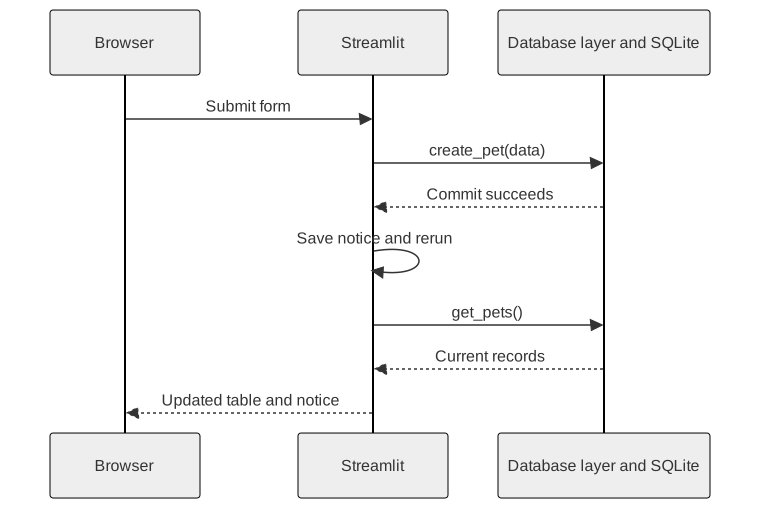
A Notice Across Runs
st.session_state["notice"] = "Pet added."
st.rerun()
On the next run:
st.success(st.session_state.pop("notice"))Edit the Selected Record
prefix = "pet_" + str(pet.get("id", "new"))Casey’s fields and Luna’s fields have different keys.
Reassign Casey. Save. Reopen the form.
Delete with the Relationship Intact
Confirm the selected record.
An owner with pets cannot be deleted.
Reassign the pets, then delete the owner.
Try the Same Work in Two Tabs
Change a pet in one tab.
Rerun the other tab by changing its sidebar selection.
Which state is shared?
Keep the Database Boundary
Interface: collect values and display results
Database layer: store records and enforce rules
Next comparison: the same application in NiceGUI