Database Constraints
Pets, owners, and rules for their relationship
One Owner, Several Pets
| Pet | Owner | City |
|---|---|---|
| Casey | Alex | Kent |
| Heidi | Alex | Kent |
Alex moves to Akron. Where should that change live?
References to Owner Records
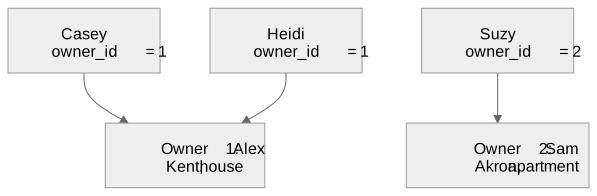
One owner can have many pets. Each pet has one owner.
Running the Example
python3 setup_database.py
flask run
http://127.0.0.1:5000/list
Manage Owners opens the owner pages.
The Owner Table
CREATE TABLE owner (
    id INTEGER PRIMARY KEY AUTOINCREMENT,
    name TEXT NOT NULL,
    city TEXT,
    type_of_home TEXT
);
id identifies the person. name describes
them.
The Pet Table
CREATE TABLE pet (
    id INTEGER PRIMARY KEY AUTOINCREMENT,
    name TEXT NOT NULL,
    type TEXT NOT NULL,
    age INTEGER,
    food TEXT,
    owner_id INTEGER NOT NULL,
    FOREIGN KEY (owner_id) REFERENCES owner(id)
        ON DELETE RESTRICT
);
Two Rules on owner_id
| Value | Result |
|---|---|
NULL |
Rejected by NOT NULL |
| An absent owner’s identifier | Rejected by the foreign key |
| An existing owner’s identifier | Accepted |
Referential integrity: references point to existing records.
Foreign Keys on This Connection
connection.execute("PRAGMA foreign_keys = ON")

fk = connection.execute(
    "PRAGMA foreign_keys"
).fetchone()[0]
assert fk == 1
A separate connection needs its own setting.
The Database Interface
| Pet operation | Owner operation |
|---|---|
get_pets() |
get_owners() |
get_pet(id) |
get_owner(id) |
create_pet(data) |
create_owner(data) |
update_pet(id, data) |
update_owner(id, data) |
delete_pet(id) |
delete_owner(id) |
Names on Screen, Identifiers in the Form
<select name="owner_id">
  {% for owner in owners %}
  <option value="{{ owner['id'] }}">
    {{ owner['name'] }}
  </option>
  {% endfor %}
</select>
Alex appears on screen. "1" travels with the
request.
Saving the Reference
cursor.execute(
    "INSERT INTO pet(name, age, type, food, owner_id) "
    "VALUES (?,?,?,?,?)",
    (data["name"], data["age"], data["type"],
     data.get("food", ""), data["owner_id"]),
)
connection.commit()
SQLite checks the relationship during the insert.
Application Checks and Constraints
| Check | Where it happens |
|---|---|
| Owner selection is blank | Flask route |
| Owner selection contains non-digits | Flask route |
| Referenced owner exists | SQLite |
Required fields are not NULL |
SQLite |
A dropdown helps selection. The database checks the relationship.
Displaying Owner Names
for pet in pets:
    pet["owner_name"] = "<Unknown>"
    for owner in owners:
        if owner["id"] == pet["owner_id"]:
            pet["owner_name"] = owner["name"]
owner_name is for display. owner_id is
stored.
Reassigning a Pet
Select Sam in Casey’s owner dropdown, then save.
database.update_pet(10, {
    "name": "Casey", "age": "9", "type": "dog",
    "food": "kibble", "owner_id": "2"
})| Pet | Before | After |
|---|---|---|
Casey, id=10 |
Alex, owner_id=1 |
Sam, owner_id=2 |
Casey’s other fields stay the same. Both owners remain.
Deleting an Owner
FOREIGN KEY (owner_id) REFERENCES owner(id)
    ON DELETE RESTRICT
Alex still has pets: deletion fails.
Reassign those pets, then delete Alex: deletion succeeds.
Testing the Relationship
python3 database.py| Test operation | Expected result |
|---|---|
| Create pet with absent owner | Constraint error |
| Delete owner who has pets | Constraint error |
| Remove pet, then delete owner | Success |
Food as a Shared Record
Two pets eat the same food.
What would change if food had its own table?
| Now | Proposed exercise |
|---|---|
pet.food contains text |
pet.food_id refers to a record |
| Form accepts a food name | Form selects an existing food |
Rules Belong with the Records
Store the identifier that defines the relationship.
Let the database enforce whether that reference is valid.
Test both accepted changes and rejected changes.