Introduction to Web Applications
A browser interface for the pet database
The Pet Application
- Requests select Python functions.
- Templates produce browser pages.
- Forms supply values for database operations.
- Saved records survive the server stopping.
Running Flask
From a working copy of
chapter-03-intro-to-web-apps/code:
flask runhttp://127.0.0.1:5000/petsThe supplied pets.db holds the existing records.
Reading a URL
Uniform Resource Locator (URL)
http://127.0.0.1:5000/pets| Part | Meaning |
|---|---|
http |
Protocol scheme |
127.0.0.1 |
This computer’s loopback address |
5000 |
Port |
/pets |
Requested path |
A Request Calls a Function
@app.route("/bye", methods=["GET"])
def get_bye():
    return "Bye!"
GET /bye receives Bye!
A Value in the Path
@app.route("/hello/<name>", methods=["GET"])
def get_hello(name="world"):
return render_template("hello.html", name=name)<body>Hello, {{ name }}! (from the template)</body>/hello/Ada displays Hello, Ada! (from the
template)
Loading the Pet List
cursor = connection.execute("select * from pet")
rows = cursor.fetchall()
return render_template("pets.html", pets=rows)
(id, name, kind, age, food)Each returned tuple becomes one displayed row.
A Template Builds the Table
{% for pet in pets %}
<tr>
    {% for item in pet %}
    <td>{{ item }}</td>
    {% endfor %}
</tr>
{% endfor %}
{% ... %} controls the loop. {{ ... }}
inserts a value.
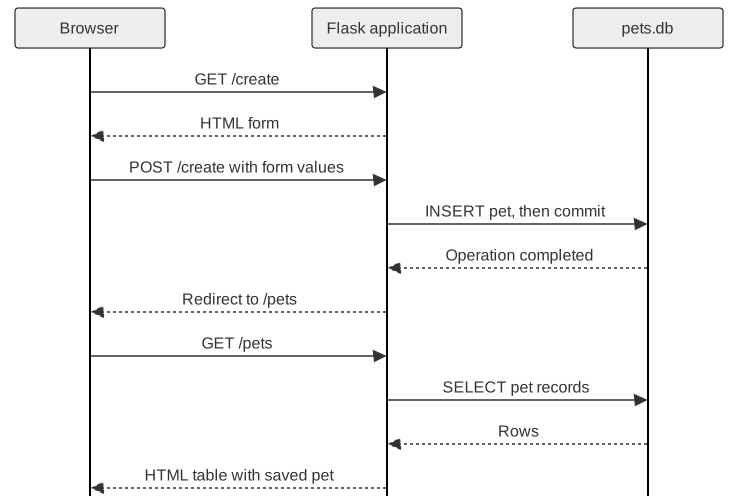
Opening and Submitting a Form
| Request | Function | Result |
|---|---|---|
GET /create |
get_create |
Blank form |
POST /create |
post_create |
Saved pet, then redirect |
Same path. Different methods and work.
Named Inputs Become Form Values
<form action="/create" method="post">
    <input name="name"/>
    <input name="age"/>
    <button type="submit">Create</button>
</form>
data = dict(request.form)data["age"] arrives as a string.
Saving the New Pet
connection.execute(
    "INSERT INTO pet(name, kind, age, food) "
    "VALUES (?, ?, ?, ?)",
    (data["name"], data["kind"],
     data["age"], data["food"])
)
connection.commit()
SQLite supplies the identifier.
After the Save
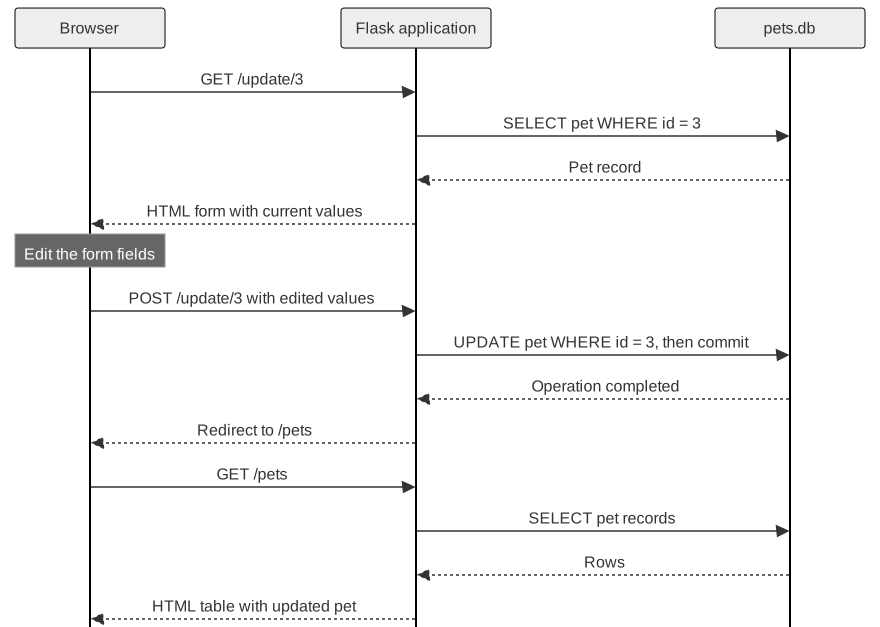
Editing Pet 3
GET /update/3cursor.execute("SELECT * FROM pet WHERE id = ?", (id,))<form action="/update/{{data['id']}}" method="post">
<input name="name" value="{{data['name']}}"/>The loaded value becomes the form’s starting value.
The Persistence Cycle in an Edit
Deleting a Pet
GET /delete/3connection.execute("DELETE FROM pet WHERE id = ?", (id,))
connection.commit()
return redirect(url_for("get_pets"))The refreshed list shows the remaining pets.
Tracing an Application Operation
Request: Which path and method?
Route: Which values and database operation?
Response: A page, a redirect, or an error?
The database preserves state between requests.